Attraction Website Design & Web Hosting

Web design, SEO and internet marketing techniques for business owners.

  • About
    • Portfolio
    • Our Rates
    • Payment for Services
    • Client Reviews
  • Web Design
    • Mobile Responsive Websites
    • Landing Pages
    • Web Hosting
    • WordPress Admin Training
    • WordPress Care Plan
    • Domain Registration
    • Search Engine Optimization
    • FAQ
  • Marketing
    • Videos
    • Google Business Profile
    • CRM / Marketing Automation
    • Social Media & Blogging
    • Google Marketing Videos
  • Blog
  • Contact

Website Pages – Testimonials & Portfolio

October 1, 2013 by Ray

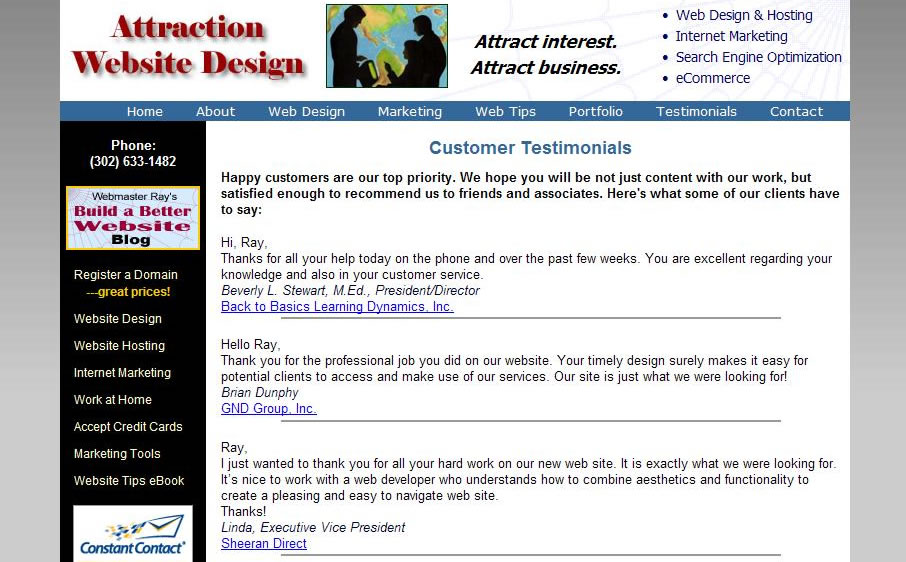
Testimonials

Demonstrate your effectiveness to potential customers by providing positive feedback that you’ve received from current ones. Reinforce the fact that you are trustworthy, reliable, and get the job done correctly. You should include a minimum of four. If you don’t already have any, request them from happy customers. Explain that they can benefit by including a link to their own website!

Testimonial page on website
A Testimonials page shows that customers appreciate what you have accomplished for them or the problem you have solved.

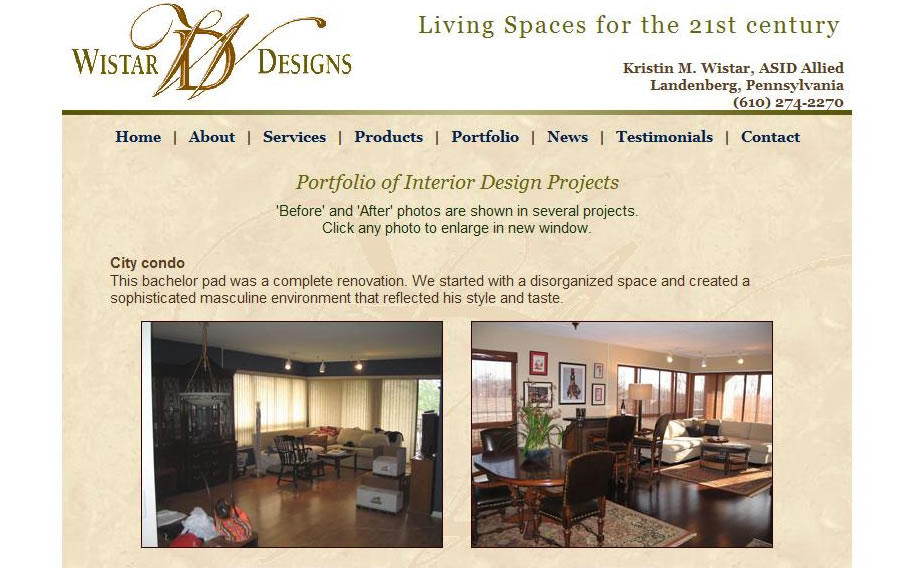
Portfolio / Customer List

Offer snapshots (literally and figuratively) of successful projects or the names of client companies. If possible, include a small photo or the logo of each client. Link to client websites and include contact information if they agree.

Comparison to competitors

Compare your product side by side with one or more competitors to persuade visitors to choose yours. A checklist format works well to lead people to the right conclusion. After a head to head comparison, you can add supplementary information such as product history, applications for use and any relevant statistics.

You can even tout your own website as providing better customer support.

before and after photos
Photos showing before and after are the easiest way to display results. You may also compare your work with that of a less qualified competitor.

Tutorials

Provide tutorials or step-by-step guides to illustrate how the customer can easily use and benefit from your product/service. This information can be more focused than general articles which offer objective advice. Take visitors by the hand and carefully walk them through the steps to use what you’re selling. The longer you keep them at your site, the better chance of a sale.

Filed Under: Web Design Tagged With: important website pages, portfolio page, testimonials page, web designer, website content, website pages

Website Pages – Contact Us & Directions to Location

August 2, 2013 by Ray

Don’t spend alot of time convincing prospects that you have the best products or services known to man, but then forgetting to make it easy to get in touch!  Display your contact info prominently throughout the site, but add a contact page with all of your info and show a map to help them find your physical location.

Contact Us
Make it easy for people to contact you! If you are not selling items directly online, this is the most important page to drive traffic to. List all possible ways to contact your company, including phone, email, fax, Twitter, LinkedIn, mailing address, physical address and office hours. If you have several departments, provide instructions for contacting each to prevent confusion.

Contact Us page

• Email contact form – make it easy for visitors to “fill in the blanks” and select items they are interested in. Include fields for their phone number and required email address.
• Never ask for more information than you need – be careful not to turn off visitors. Once there is a commitment, you can request further details.
• Photo of owner or smiling staff members on the page again shows that you are real people who care about your customers.

Location or Directions

Make it easy for people to find you! If you want people to visit your main office or branches, display directions online.

Directions or Map page

• Driving directions from various points.  From north or south, from neighboring towns.  Use landmarks such as “turn left at the Exxon gas station”
• Map showing your location(s). Even an outside source such as Mapquest is handy to allow changing of a map’s scale.
• Photo of the facility or your signage so it can be recognized from the road or parking lot.
• Office hours and instructions on any sign-in procedures.
Include contact info or links for help in case of confusion.

Contact Webmaster Ray for more ideas related to your own website.

Filed Under: General, Web Design Tagged With: contact information, contact page, directions, location page, SEO, website pages

Website Pages – Products & Services

June 15, 2013 by Ray

Your home page should motivate visitors to click through to the particular product, service or contact page to they can successfully find the solution to their specific need or problem.  Depending on how many categories you have, there may be one overview page or simply links to any category of interest.  That Products/Services page needs to contain enough info to drive them to “buy now” or contact you.

Products / Services Overview
Display a brief summary of each product or service line. Then link to the individual item detail pages. This page can help visitors quickly narrow down exactly what they are looking for while motivating them to learn more.  Give just enough details to lead prospects to the next step of the sales process.

Products page - restaurant menu

• Name, photo and brief description of each item.
• Lists of sample uses or top features for each item.
• Links to individual item pages.

Product / Service Details
Each item (or sub-category of items) can have it’s own sales page with photos, descriptions and specifications along with a call to action to purchase now, email for more info or call now!  Additional info can be included using links to it so that it’s optional to be bombarded by the specifics.

Services page

• Begin each page with a brief summary of the product/service. When people search for information, they want it immediately
• One or more photos or a video demonstration (it’s fine to use You-Tube)
• Description including any available options or choices (colors, sizes, package deals)
• Customer reviews specific to the item.
• List of sample uses, actual customers, features or benefits.
• Prices (specific or range), terms of use, warranty information.

Before / After or Case Histories
Besides a sales page for each product or service, you may want a page of real-world samples of your work for prospects to more easily identify with than generic descriptions and sales copy.

Before & After

• Before/after photos or slideshow or video of an example project
• Description of the problem, customer requirements, timeline, difficulties overcome, and final solution.
• Names of satisfied customers along with testimonial.

Always use a call to action to prompt visitors to next step of the sales process.

Contact Webmaster Ray for more ideas that relate to your project.

Filed Under: General, Web Design Tagged With: before and after photos, product page, SEO, web pages, website pages

Website pages – About & News

May 1, 2013 by Ray

There are many possible secondary pages that can help close the deal for visitors to contact you or request information.  “About Us” isn’t critical to your product or service, but the information you include can help to set you apart from the competition or give visitors “another” reason to contact you.  Stand out from the crowd and explain what makes you special!

About Us
This page (aka “About Us” or “Our Company”) may include any kind of background information to make visitors more comfortable with you. Company history, mission statement, introduction of staff members, awards and honors, or explanation of what separates you from the competition. On the surface, you may provide similar products or services as others, but certain secondary facts displaying your unique qualities can close the deal. Maybe you assist a charity that’s important to some potential clients.  Maybe you’ve won an award.  Maybe you have a unique certification.

about website page
About page

• Photos of owners or employees – show that you are human beings and not just “brand x”
• Logos of industry affiliations, chambers of commerce, well-known vendors and even large customers
• Mission statement, warranty or guarantee, message from President
• Background of the company and certifications earned – use this page to brag about yourself! Include miscellaneous items that don’t fit on other pages.

News Page
News or “Announcements” pertaining to your products, industry or company can be a great way to show that you are active and conscious of keeping customers informed. Web surfers will often view to check for the latest information. It is another opportunity to tout your accomplishments or show involvement in the community.
Stay current, to prove that you’re on top of everything

News page

• Announce new products, product lines or improvements.
• Press releases, new testimonials from customers, related topics
• Sales, special deals, promotional offers
• Honors received, partnerships formed, new staff members

Events Calendar
Events list or ‘Upcoming Events’ or ‘Schedule’ can provide details of meetings, trade shows, seminars, or any type of events that occur on a regular or periodic basis. You may wish to include a page of past events as well, to possibly include photos and a recap of the activity.

Show people how involved you are in the community and how you provide great support.  Show people that you’re busy!

Events page

Contact Webmaster Ray for more ideas.

Filed Under: General, Web Design Tagged With: about page, SEO, upcoming events, website pages

Website pages – home & splash

April 21, 2013 by Ray

Each page of your website contains elements that contribute to it’s overall success.  They must complement each other in achieving your goal — a call to action on the part of visitors. Home page is the main portal, and therefore deserves extra attention.

Home page of Attraction Web Design site

Maximize the value of each website page
Every page of your website contains elements that contribute to it’s overall success.  They must complement each other in achieving your goal — a call to action on the part of visitors.

Avoid Splash pages
Some sites start with a “front page” or “landing page” containing merely a brief video or static image, along with an “Enter” link.  In most cases, this is unnecessary and requires surfers to click again to get to the information they came for.  This can be frustrating to people and a page like this contains very little information for the search engine tigers to chew on!  Skip this and get to the point right away…

Home (index) page
The home page is by far the most important part of any site.  It is the main doorway to your organization by which the vast majority of visitors will arrive at.  First impression is key to help them decide to view internal pages.  You have 3 to 7 seconds to capture attention and convince visitors to stay, so the initial appearance, site title and headline should draw them into reading a brief introduction to your company. 

   • Official company logo – use similar colors and design as printed materials
   • Website title or company name – state your topic or name of organization
   • Main Headline – grab attention with a question or solution to a problem
   • Text – at least one or two paragraphs of introduction to your company and what you can do for your customers (or members).  Squeeze in as many “search terms” as possible without making copy hard to understand.
   • Images – one or more photos or graphics should reinforce the text and be a visual representation of how the site will help visitors
   • Slideshow or video – if a picture is worth 1,000 words, moving pictures could be worth a million!  Use your very best images to tell your story
   • Contact information – all pages should make it easy for visitors to request more information, but it is imperative that a phone number, email address or mailing address be visible to people ready to contact you based on their first glance at your site!
   • Current info – update home page regularly with a news item or mention a recent event to prove to visitors that your site is actually current.
   • Bullet lists – to avoid overwhelming visitors with lengthy text, use concise lists of features, benefits, samples or reasons for people to delve deeper into the site.   
   • Newsletter sign-up – Opt-in area for eBulletin, free gift, or membership to capture contact information for additional marketing opportunities.

All of these features should drive visitors toward a specific “Call to Action”. Failure to convert potential customers into sales leads is mostly due to homepages lacking primary and secondary calls to action. It may be a link that states, “Contact us for details” or “Tell us your situation and we will set up a conference call.”  Guide web users along your sales process to convert more of them into customers.  Read more tips!

Filed Under: General, Web Design Tagged With: home page, index, landing page, splash pages, visitors

  • « Previous Page
  • 1
  • …
  • 9
  • 10
  • 11
  • 12
  • 13
  • …
  • 19
  • Next Page »

(302) 633-1482

Mobile Websites

Marketing Blog Articles:

Categories

  • General (50)
  • Internet Marketing (23)
  • SEO (24)
  • Web Design (49)
New Castle County Chamber of Commerce member

Veteran Owned Business
USA web designers
Unbeatable Customer Service
Anywhere in the USA!


Register domain names

Home
About
Web Design
Mobile Websites
Website Hosting
Marketing Videos
Google Business Profile

SEO
FAQ
Blog / Articles
Portfolio
Reviews
Payments
Contact Us

Attraction Website Design
2630 Crossgates Dr
Wilmington, DE 19808

(302) 633-1482

Ray@AttractWeb.com

© 2003 - 2026 Attraction LLC - Website Designer, blogs & online marketing in Wilmington, New Castle & Newark, Delaware + Pennsylvania, New Jersey, New York & across the USA.

Mobile websites, Search Engine Optimization (SEO), Video Marketing, Social Media & more internet advertising services by Webmaster Ray

Hosted by Attraction Domains    Privacy Policy

Site by Attraction Web Design

Scroll Up